Last time, I showed how I used a combination of the AI tools of Google Gemini and Grok to turn this…
into this…
The above video clip is intended to be a part of one of MARK NACCARATO’s upcoming fan films that take place during THE ROMULAN WAR. It was the second time I used AI to help create a short scene for him. The first time was a couple of days earlier when I used a combination of those same two AI applications to produce this short clip of a young T’Pau giving a speech to the Vulcan Council…
Part 2 blog showed how many different prompts I had to go through to change the four fans in front of a green screen into a starting “seed” still image of the four Starfleet officers drinking in the 602 Club. And then I had to go through a few different video prompts and renderings to then turn that one seed image the 10-second toast scene that I wanted. AI takes patience, persistence, and an ability to try to figure out what went wrong with your previous prompt and then to write something more carefully to avoid the same problem again…and again. Lather, rinse, repeat—possibly dozens of times!
AI isn’t a mind-reader quite yet. In fact, it’s frustratingly literal most of the time and unpredictable much of the rest of the time. But it still does some mind-blowing things in just a minute or two—occasionally for free or for a relatively affordable cost considering what it’s able to do for you.
Today, I’m going to continue this 4-part series with the third challenge handed to me by Mark: turn a series of flatly-lit green screen takes of actor BRIAN HOLLOWAY into Captain Aaron Stiles of the USS Challenger NX-03, sending a series of subspace messages from his quarters to Captain Jonathan Archer of the USS Enterprise NX-01. (Brian had previously worked on fan films for STAR TREK: PHASE II, THE FEDERATION FILES, and DREADNOUGHT DOMINION.)
Just to help me do a proof of concept, Mark sent me the following clip of part of one of Stiles’ messages to Archer. It was a thank you for a recording Archer had made expressing his condolences on the death of one of Captain Stiles’ sons, Brandon, a tribute that was played during the funeral…
The main difference between this project and the previous one of the officers giving the toast was that with Stiles, we already had the audio, which Mark wanted to keep. For the toast, Grok’s AI just created new voices that said what I typed in. But this time, Brian’s voice needed to remain intact in the final video. Turns out that Grok doesn’t have that ability at this time. So I needed to find an AI application that could retain the initial sound and render a new video with lips that synced to it.
Once again, I asked the “AI Whisperer,” my good friend ADAM “MOJO” LEBOWITZ for the solution, and he quickly told me: Kling Omni…
It turned out that application was too problematic for me to use cost-effectively. If I didn’t want to pay for a second monthly subscription (I was already on the hook for $30/month for Grok), it would charge by the render—between $1.50 and $2 each time—meaning that a troublesome project with dozens of renders could start running up the price tag pretty darn quickly. That said, I did use it to create a really good first attempt!
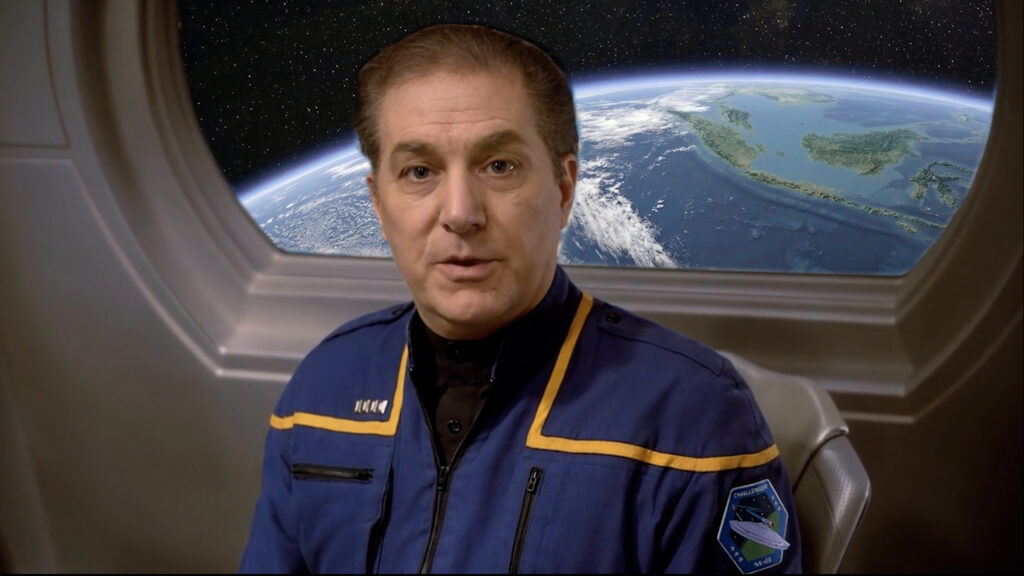
Kling Omni allows the user to upload both images and videos from reference (Gemini and Grok allow only images). So here’s what I did. I once again started with Gemini to create a still image to base the video off of. I uploaded to Gemini the full NX-era Starfleet uniform design along with a still image of Brian Holloway. The I asked Gemini to create a 16×9 rectangular image of the man in the close-up shot (Brian) sitting in the Captain’s ready room from the television series Star Trek: Enterprise, wearing the full uniform from the first uploaded reference image. Oh, and make sure we see the earth out the window from a high orbit.
Got all that? Well, fortunately, AI can track complex instructions, and what I got looked amazingly good!
So I uploaded this image along with the 10-second video clip of Brian and asked for Kling Omni to have the man in the chair deliver the lines from the video with the same sound track. I asked for a few more flourishes (because I like being a director), like having him spin slightly in his chair to face the camera as he speaks, having a subtle camera zoom-in during the scene, and to have him give a little wink at the end. The first result was really good, albeit not quite perfect…
I had high hopes that I could fix the glitches in this video—just as I’d done with the four officers toasting in the 602 Club. But that first rendering turned out to be beginner’s luck, and the next ten renderings (costing me an additional twenty bucks!) got progressively worse. I don’t have any of them to share because Kling Omni doesn’t save renders if you’re not subscribed. You have to download them immediately or lose them forever.
I quickly decided that neither Mark’s nor my budget could handle the cost of my learning curve, and I would go back to Grok, where I was already paying $30/month for a subscription. But I wasn’t going back empty-handed. Thanks to that one good render, I was able to seed Grok with four anchoring images, and I used Photoshop to change the sleeve patch to the Challenger NX-03 design that Mark supplied me with…
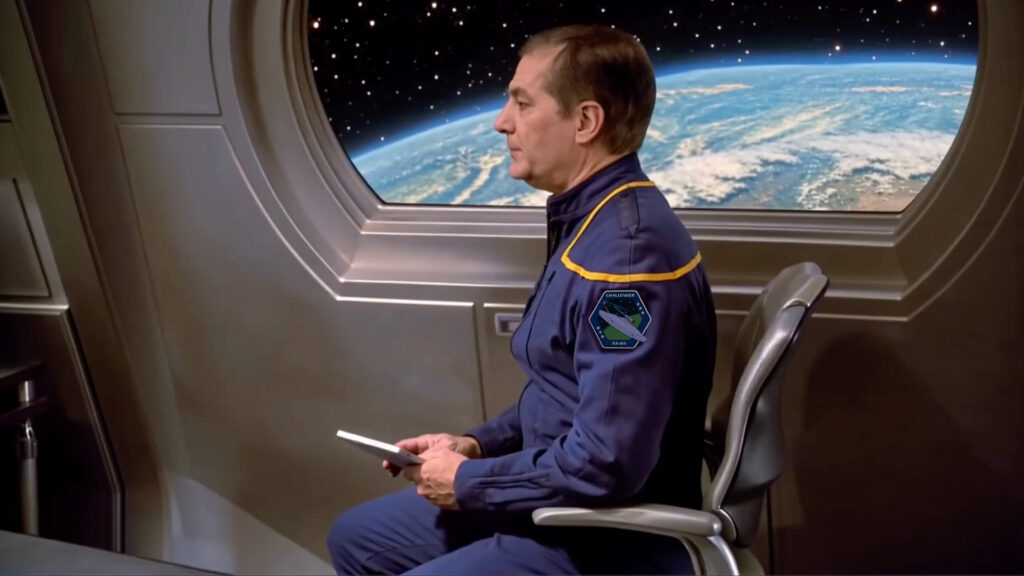
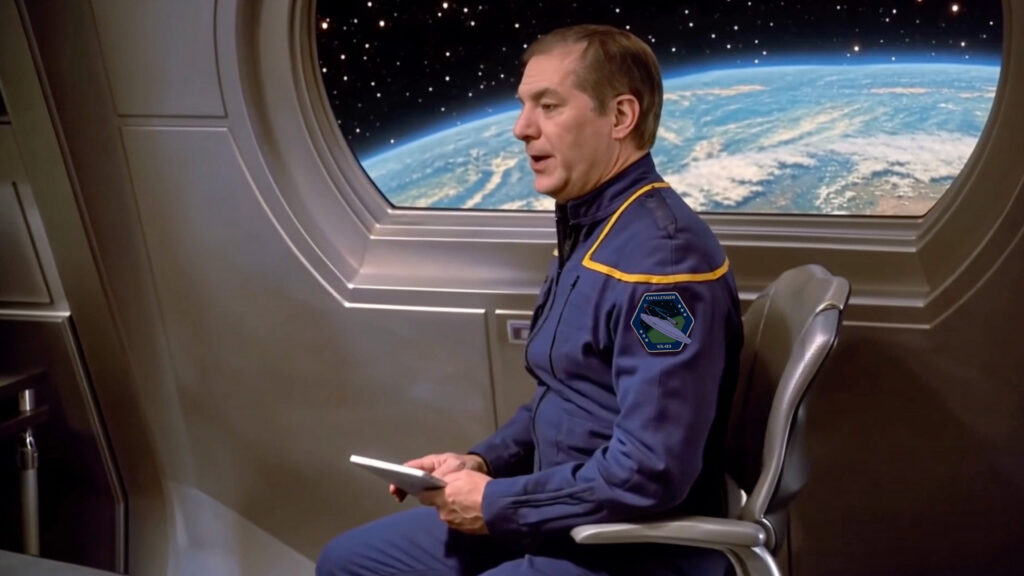
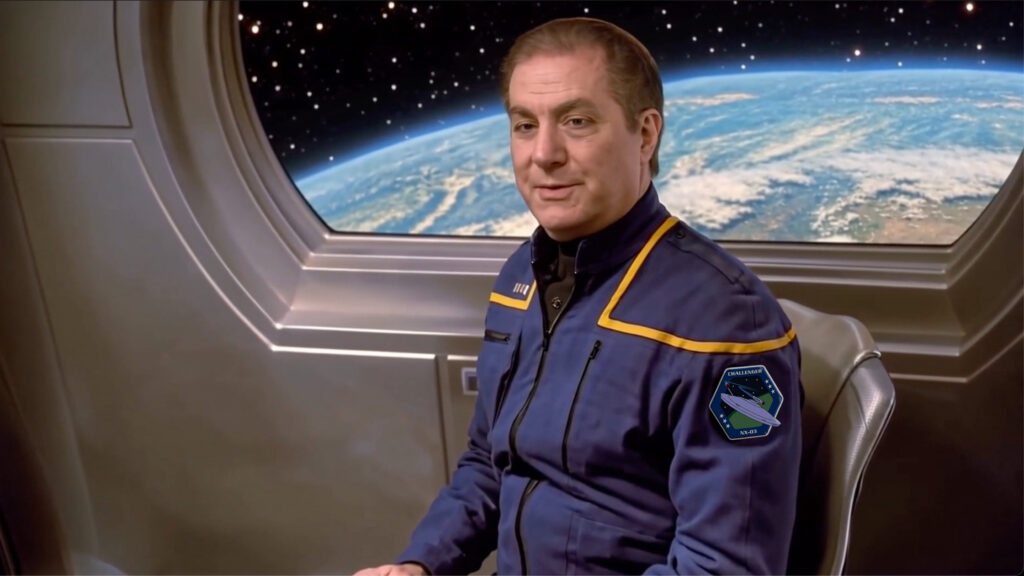
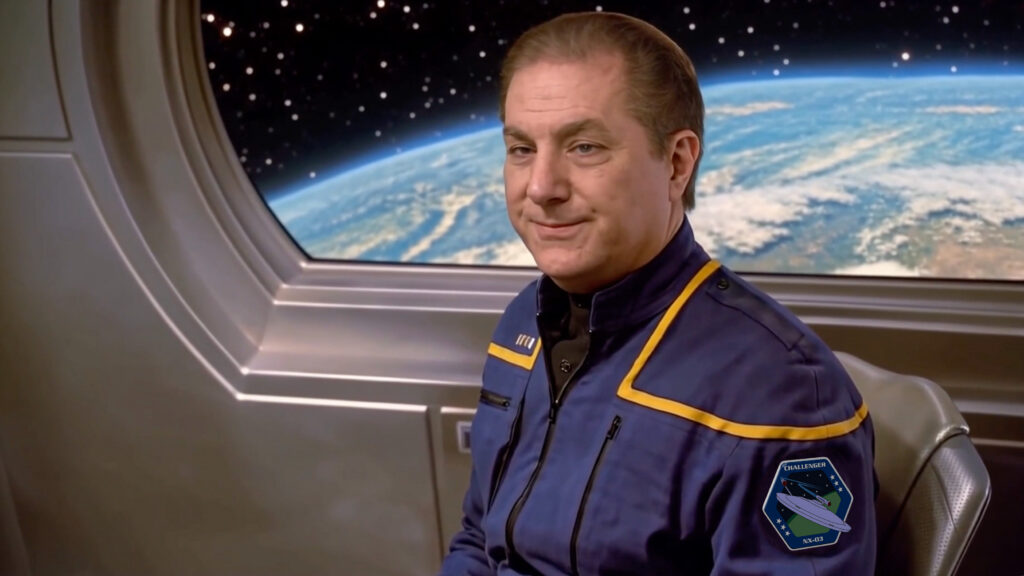
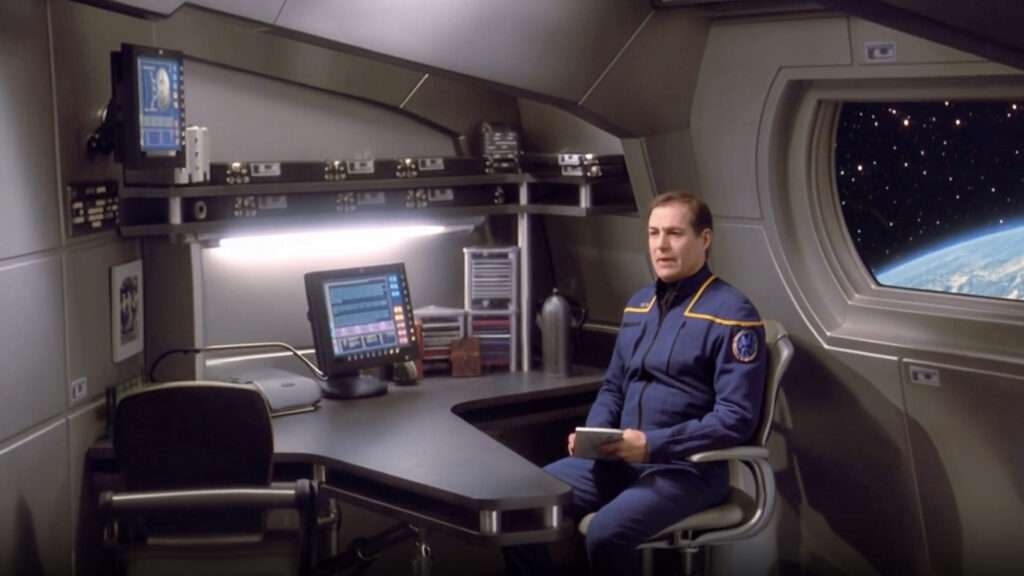
This allowed me to set a nice zoom in while Captain Stiles is swiveling in his chair. The only thing missing was a desk. I also didn’t want him to hold on the wink, as he did in the previous video. I uploaded the four images (above) plus the establishing wide shot with the desk, and I typed the following prompt into Grok…
Using the first four images, create a shot of this character that slowly zooms out. As he turns toward the camera, he speaks the following dialog:
“Jon, I wish you could have been there to hear it in person. He was somethin’ else. Woulda made a Vulcan cry…even yours. “
Right after he finishes speaking, he gives a quick wink and smiles slightly. Then both eyes open again as he holds the smile for another second and a half. In the background as ambient noise, have the ambient low hum sound of a starship engine from the television series “Star Trek: Enterprise.” Make certain his eyes are always looking toward the camera throughout the entire shot. Using the last image for reference only, please place this character behind a desk similar to the one shown in the last image.
And this is the video I got…
Oh, uh…typo! I accidentally asked for a zoom OUT, not in. But that looked pretty decent for a first attempt. I corrected the typo and soon discovered that Grok does not handle winks well at all. Here are just two of about seven attempts that all completely screwed up the wink…
You’ll also notice that AI is like a box of chocolates: you never know what you’re gonna get. The same prompt resulted in completely different zoom amounts and speeds, completely different office furniture and backgrounds (including the second one that had weirdly shifting walls at the end), completely different orbital directions of earth, and a host of glitches in his speech. YUCK! Oh, and I realized I had another typo: the line is supposed to be, “It was something else,” not “He was something else.”
I decided to ditch the wink completely, and I corrected the second typo. It still took about a dozen more renders, which led me to discover a somewhat irritating limitation of Grok. As you probably know, AI processors require a lot of energy to operate, and that electricity costs money. So your $30/month covers only a certain number of 10-second renders at the higher quality 720p (the minimum standard for HD video). After that, the renders switch to the standard definition 480p quality. A subscriber then has to wait for the “reset” (usually about 12 hours or so) to regain the ability to generate videos at the higher 720 resolution.
Eventually, I did get a really good render. I even used the new “Generative Extend” tool in the Adobe Premiere video application on my computer (the software I use to edit videos) to extend the 10-second video slightly, and I sent it along to Mark…
I was so proud! Unfortunately, Mark assumed I knew that this was a subspace message being recorded into a computer viewer, not a cinematic shot with zooming motion. As much as he liked the way it turned out, in order to work in the ultimate fan film he’d be making, this needed to look like a recording of a message that Captain Stiles was sending to Captain Archer—it needed to be a static, close-up shot.
Also, Mark wasn’t crazy about the light levels and color saturation overall. Ah, directors! But he was right. Star Trek: Enterprise was filmed in low light, producing moody shadows and muted colors. So I adjusted the source images in Photoshop to darken and desaturate them. However, much to my frustration, I still kept getting rich, well-lit, vibrant renders. But I had a “Plan B” to fix that, too.
When I finally had a decent 10-second take of Stiles, I downloaded the video and opened it in Adobe Premiere. Then I used Premiere’s adjustments to dim the lighting, desaturate the colors, and even add a single spotlight just behind the captain’s head to light up the planet earth. And of course, I extended the video by a second (Premiere lets you add a maximum of two seconds to the end of a video, but the further along it gets the more it can drift into unwanted directions).
What I sent to Mark made me even prouder than the first clip I’d sent him (even though it was a less interesting static shot). Stiles’ delivery was one of the best yet…
Mark liked it, but it turned out that he’d sent me only the second half of Stiles’ message as a test to see how it would turn out. There was actually a beginning part, as well…
So I created a new 10-second video clip—minus the “Captain’s log” part, which Mark didn’t want included. Once again, I decided to “direct” the AI actor a little bit. Rather than just giving him the words, I inserted pauses and a brief look downward. I also needed to try to get the spinning earth to end at the same spot where the earth in the second part started. After a few miscues (including earths that spun way too fast), I adjusted the prompt to read like this…
Using the previous video, make something identical but with the following dialog… “Jonathan, I just wanted to reach out and thank you for the message that you sent.” He pauses again, thinking about his son’s funeral. Then he continues, “…for the kind words about Brandon. We played it at the memorial service.” He looks down very slightly, sad again. The shot should be static and framed close to the character, cropped slightly below the patch on his sleeve. Make sure the earth out the window matches the earth in the second photo above. Have the character speak quickly enough to fit in all of the dialogue. The earth should be rotating VERY VERY VERY slowly and the position of the earth should end the scene in the same position as the earth out the window in last uploaded photo.
Again, it took several tries, but eventually I got this…
Obviously, I used Premiere’s Generative Extend tool to add two seconds to each rendered video to get the total run time to 24 seconds. Unfortunately, try as I might to match the backgrounds, the earth, the orbital speed and direction, and the window itself were noticeably different in the first and second segments of the video. Unless Mark inserted a cutaway shot to the funeral or something, the transition would be noticeable and jarring.
But then I discovered, quite by accident, that Grok had an “extend” feature of its own. You could take a 10-second clip and extend it another 6 or 10 seconds. And indeed, you could do so again and possibly an infinite number of times. The reason I don’t know for certain is because the extended video tends to “drift” in strange ways, with words and lip movements getting progressively more garbled.
I ultimately got this clip to be “perfect” by extending a good take and getting a decent extension…
I put “perfect” in quotation marks because there are still a couple of audio glitches and places where the lips don’t completely sync to the words. Also, Stiles’ voice does not match Brian Holloway’s voice because Grok had no idea what Brian sounded like, and Grok doesn’t match voices anyway. However, ElevenLabs (which I used to create AN ABSENT FRIEND two years ago) specializes in such things. And since I would be needing to create other Stiles video clips, it would be best to have a consistent voice (Brian’s) across all the AI-generated videos.
It was easy enough to sample Brian’s voice and then upload it to ElevenLabs. However, this application had gotten so much more powerful and complex in the two years I’d been away that I needed to use the site’s own AI assistant to help me. Their AI bot is unbelievably helpful and friendly and even offered to make the adjustments I needed for me. “Please do,” I’d say, and a few seconds later, the changes would be done. Honestly, folks, the AI was an absolute pleasure to use. It even realized I was working on a Star Trek fan film and said good night to me by calling me captain! Seriously, take a look…
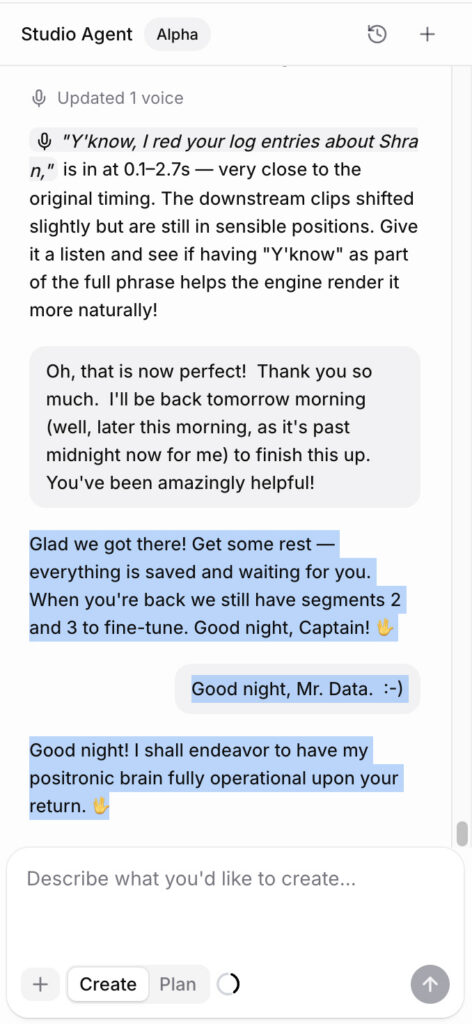
(I hope that when the inevitable AI takeover of humanity happens that our new robot overlords keep that same charming sense of humor. It’ll make the dystopian future much more enjoyable!)
Anyway, with ElevenLabs’ voice-switching, I was able to correct those sound glitches—although the lip sync issues seem to be insurmountable at the moment. Take a look and a listen…
This blog is getting pretty long, so I’ll end with the second and final clip I rendered of Captain Stiles for Mark. Again, I provided “direction” for the AI actor including dramatic pauses and facial expressions. I also turned the background into a green screen, as Mark has an out-the-window CGI warp speed effect, which is easier than trying to explain the warp concept to AI and hoping it gets it correct during a good take.
As I said, the “extend” option on Grok is a bit of a crap shoot—with the emphasis on the word CRAP. While you can lock in a good first 10-second take, the extension can go horribly wrong a frustratingly frequent amount of the time. Take a look at just a small number of samples of how the AI would screw up the extensions of the first 10-second clip with some incredibly garbled 6-second extensions…
But persistence won out in the end! Here is the final clip of Stiles, including the switch-over of the voice to Brian’s…
Next week, I’ve got one final entry in this four-part feature series, and I think it’s the most exciting yet. Why? Well, first of all, I finally make the official transition from Grok to Kling even though the monthly subscription cost is higher, and I’ll let you know why. But second and more importantly, the video clips that I managed to render came out staggeringly incredible and mind-blowing! Trust me—you will NOT want to miss the conclusion!