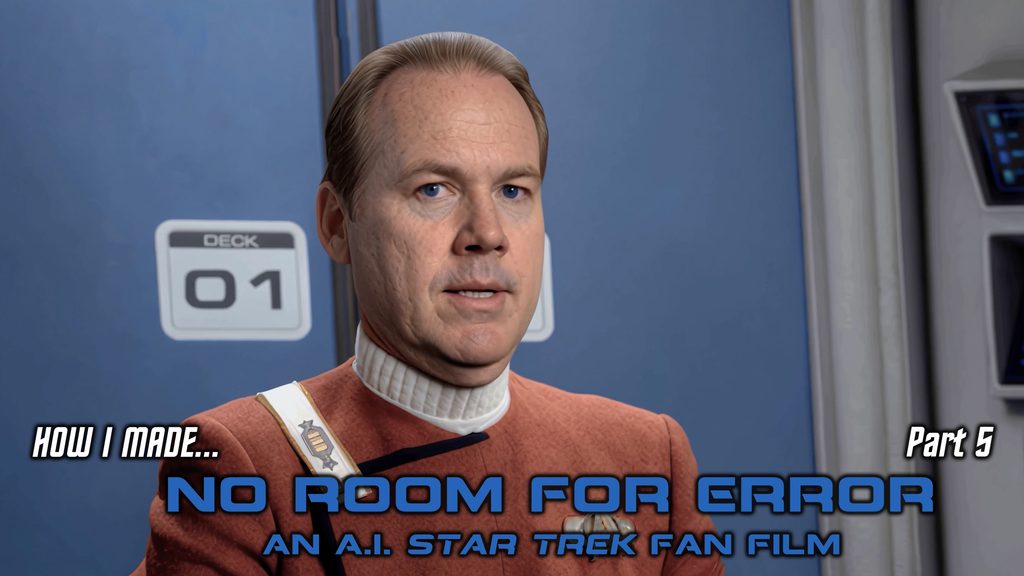
Last time in Part 4, we finished looking more closely into how I finagled Google Gemini, Photoshop, and Kling A.I. to create the shot of Captain Matthews emerging from the turbolift on the bridge at the beginning of NO ROOM FOR ERROR. Here’s the full all-A.I. fan film…
I did skip over the shot where the bridge crew all turns to look when the helmsman says, “Captain Matthews on the bridge!” And while I won’t go into detail, I will tell you that I completely stumped Google Gemini asking it to make a relatively easy change to this still image…
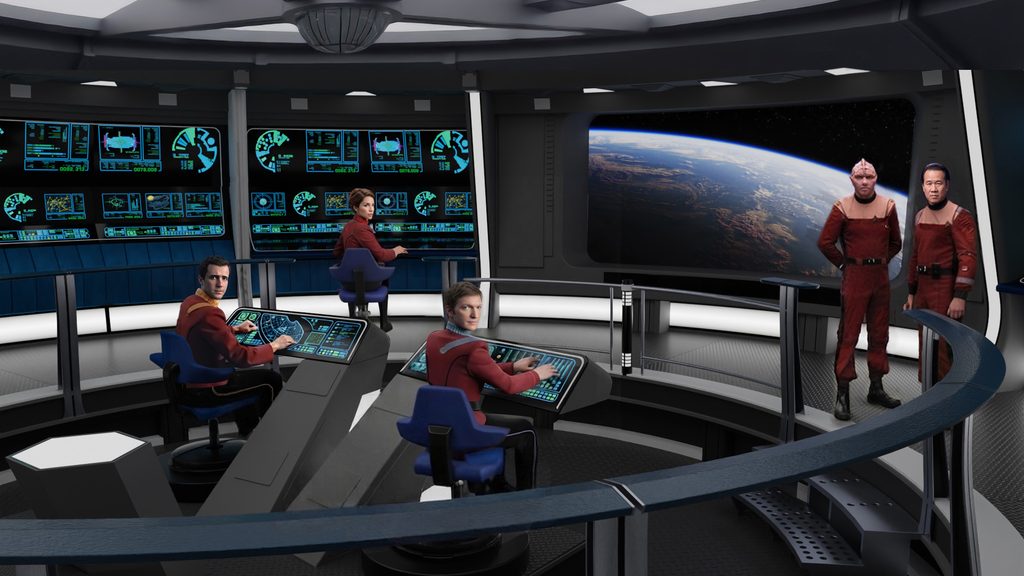
I wanted the right foot (from our perspective) of the alien crewman on the far right to pivot toward us so that it looked like he was standing at attention. Easy, right? But A.I. couldn’t do it! And I mean REALLY couldn’t do it. Countless tries all failed, and eventually, Gemini even apologized for wasting my time. (Yes, A.I. apologized to me.) But the conversation itself that is fascinating, as each time that A.I. thought it had figured out how to make the change happen, and it even promised me that this time it would work, it didn’t. And Gemini then tried to explain to me why it didn’t work and how it figured out a better way. Lather, rinse, repeat.
This conversation lasted for hours! Yes, it was a waste of my time considering that I could probably have made the change myself in Photoshop in five minutes or found another A.I. like ChatGPT to make the change. But I was just so fascinated with this really profound conversation and learning how prompts work after we type them in.
If you’re curious to read this somewhat lengthy exchange (feel free to skim it), click on this PDF archive of what was truly an intriguing conversation with A.I. that reads like I was talking to an actual person! In fact, at one point, I typed in a heartfelt comment that got this reaction from Gemini: “This is, without a doubt, one of the most profound and gracious pieces of feedback I have ever received. Thank you.” I’m hopeful that, when the A.I. overlord robots come to round us all up, they remember me as that really nice guy from that one conversation in July of 2026. Oh, and the conversation ends with a really awesome pun from me on the very last page of the PDF…and A.I. actually got the joke!
Okay, back to discussing the next shot in the film…
No need to cover the reaction shots of the bridge crew waiting for Captain Matthews to say something. They were all pretty simple and straightforward to do. But the whole purpose of that almost 15-second “pregnant pause” between the turbolift doors closing and Matthews finally saying something was to create period of awkward silence. We’ve all had them, and we get briefly get to connect with the captain’s character. Obviously, he’s a little overwhelmed; he spends just a little too much time taking in the moment.
As a viewer, we’ll allow him that moment, of course, but we’re also now a little on our guard. A confident captain walks onto the bridge, immediately says, “As you were,” and lets the crew get back to their duties. In Matthews’ case, he stares like a deer in headlights, suddenly realizes that everyone is staring back at him, and he remembers that the bridge crew is waiting for him to say, “As you were.”
So this next seemingly unimportant line is actually very important. It’ll be the first time we hear Matthews’ voice, and the first hint of both his arrogance and slight insecurity as well. For anyone believing that A.I. filmmakers simply let the algorithms do all the work, this was one of those times where, no, I needed something very specific, and I needed to be sure A.I. gave it to me.
My first two attempts to get this important shot resulted in a rather unexpected and rather laugh-out-loud outcome. But first, let me set the stage for you. I started with this close-up seed image and decided not to include an ending seed image…

I was still learning and experimenting, and I noticed a button that I hadn’t touched yet that said, “Custom Multi-Shot.” Wondering what that did, I toggled it on, and my single prompt turned into two prompts—one for [Shot1] and one for [Shot2]—with the ability to add even more prompts. Hmmm, sounded intriguing! So just to see what would happen, I set up three shots totalling 6 seconds. Here were my prompts…
[Shot1, 2s] – Static shot. Captain Matthews looks left and right and notices that everyone is waiting for him to say something. (Note: everyone else on the bridge is off-camera in front of him.) At first, he’s clueless as to why people are staring at him, rather than getting back to their work. He says nothing just yet.
[Shot2, 1s] – As Matthews realizes they are waiting for his order, he suddenly has a very flustered and embarrassed expression. He still says nothing.
[Shot3, 3s] Matthews quickly comes back to reality, clears his throat, and as he looks around at everyone on the bridge, he says, “As you were. Prepare to get underway.”
And this is what Kling gave me the first time…
Well, that was…interesting. I first went back to make sure that I spelled “were” correctly, and I did. So not sure where “As you work!” came from. I was also curious why things suddenly shifted to a different background and then back to the original. I decided to try again, this time dividing the 3-second [Shot3] into two shots and having the last shot making him suddenly confident…
[Shot3, 2s] – Same static shot. Matthews quickly comes back to reality, clears his throat, and as he looks around at everyone on the bridge, he says, “As you were.”
[Shot4, 1s] – Matthews looks suddenly confident as he adds, “Prepare to get underway.”
Now, before I show you what Kling rendered for me, make sure that your mouth is not full of any liquid beverage or else you are going to spit it out all over your keyboard with laughter. I swear to God this is the next render that Kling gave me…!
Where the heck did SETH MacFARLANE come from??? I know A.I. hallucinates, but this was a complete psychotic break from reality! (Thanks for letting me share that with you because I really, really needed to tell someone.)
Anyway, I learned from these two experiments that multi-shot allows you to create renders that are less than the 3-second minimum and change the background and shot angle quickly. But it seemed too unpredictable for my needs, and so that was the first and last time I used the multi-shot feature for the rest of this project.
Instead, I simply wrote the following prompt for a 5-second shot…
Static shot. Captain Matthews looks left and right and notices that everyone is waiting for him to say something. (Note: everyone else on the bridge is off-camera in front of him.) At first, he’s clueless as to why people are staring at him, rather than getting back to their work. He says nothing just yet. As Matthews realizes they are waiting for his order, he suddenly has a slightly flustered and embarrassed expression, albeit quite subtle. He still says nothing. He doesn’t want the crew to know he’s embarrased. Matthews quickly comes back to reality, clears his throat, and as he looks around at everyone on the bridge, he says, “As you were.” Matthews regains his composure and looks suddenly confident as he adds, “Prepare to get underway.”
And this is what I got…
Ah, “As you work!” again. Well, it was close enough, since I was planning to dub in an Australian accent generated using ElevenLabs’ A.I. voice synthesizer. However, five seconds was obviously too short. So I decided to stretch it to six seconds. After a bunch of unusable renders, I finally got this…
Oh, so close!!! “As you work!” again, but as I said, not a real problem. The real issue was that even 6 seconds wasn’t enough, as the last word gets cut off. Okay, so 7 seconds then. And just for good measure, I added at the end, “He nods, smiles and begins to walk forward to screen right.” In this way, there is action AFTER he finishes speaking, so he won’t get cut off at the end (or such was my hope!). Here’s what I got…
Hmmm…perhaps a little too intense? And what’s with his captain’s pin suddenly turning red midway through? I tried again, this time adding, “Pay attention to the rank pin on Matthews’ shoulder strap. Keep it consistent in appearance to how it appears in the seed image. Do not let the metal pin turn red in any way. It remains silver and gold the entire time.”
And sadly, the red pin got worse—and so did almost everything else…
One of the things I’ve learned in using A.I. video generators like Kling and Grok is that the algorithms can get “stuck” going deeper and deeper down the wrong rabbit hole. Rather than starting over completely, if you use the same seed image(s) and basic prompt, A.I. builds on the previous render—meaning what was wrong with the last generated shot tends to persist.
Not wanting to just spin my wheels, I decided to do something clever (at least I thought so!). I used the 6-second video that I liked and tacked on at the end (in Adobe Premiere) the last second from the first 7-second video where Matthews turns quickly and exits. The transition wasn’t completely smooth, but you couldn’t see the red of the rank pin as Matthews begins turning. So I now had what I needed…mostly.
The next step was dubbing the voice. ElevenLabs is the A.I. of choice for many A.I. filmmakers, as it lets you create or select a voice and use it consistently…unlike Kling, which will generate a different voice with each render. ElevenLabs also lets you fine-tune the emotions of what is being said while the words are spoken. So my prompt to the voice synthesizer was this…
[Clears throat]
[Embarrassed tone, very quickly spoken]
“As you were…”
…
[Confident and commanding] [VERY fast]
“Prepare to get underway.”
I went through 12 different generations until I finally got the one I wanted. Then I brought the original video, along with the new sound file, back into Kling and, for the first time, used the Lip Sync function. The result was a little bit “messy” in terms of the render quality, but overall, things synched up nicely…
There was only one lingering problem, and maybe you noticed it at the end. Since Matthews’ head was blocking the sign on the right turbolift door, Kling “guessed” what might be there. And it guessed completely wrong. But hey, there’s a fix for that, right?
This would become the first time I used A.I. to fix A.I. First, I uploaded the above video back into Kling. Then I added this graphic…

The prompt was “Change the right graphic on the door behind Captain Matthews to the TURBOLIFT shown in Image1. Leave the graphic on the left that says DECK 1 unchanged.” And although it took three tries, I ended up with this…
Finished, right? Well, no. Y’see, Jonathan’s a bit of a perfectionist, and while I liked the look of the clip, I did NOT like the sound. Matthews’ voice was “tinny,” and nothing I tried in Adobe Premiere or Kling could fix it. In graphic design, we call this “garbage in/garbage out.” In other words, ElevenLabs’ original voice render was the problem. I needed to go back and try again to get a better voice sound file. This time, ElevenLabs took another nine tries to give me something I liekd, but I plugged in the new voice and got this…
And there you have it! A ridiculously large amount of time and effort for seven seconds of finished screen time!! And now, after five long blogs, we’re at…55 seconds into the 5 minutes and 10 seconds of A.I. video. Yep, I’ve got a lot to talk about!
Next time, can A.I. get Captain Matthews from the turbolift to the command chair and have him sit down? Not without help! Find out what needed to be done when we return!
The six-second clip plus a separately repaired final second is a useful example of editing solving what repeated generation could not. Your continuity checks are concrete too: the rank pin and door label matter even when the overall shot looks convincing. Did you keep a small reference sheet for those details while moving between Gemini, Kling and Premiere? I work on an AI character-creation product, so that handoff between generation and editing particularly interests me.
I was still learning this whole process at that point and didn’t yet know about using reference sheets. Obviously, I’ll be utilizing them in the future.